Get Ready For E-Verify

When Minneapolis employment agency received a “Notice of Inspection” from the U.S. Immigration and Customs Enforcement (ICE) agency, requesting a review of Form I-9 for all employees within five working days, the company responded two weeks later with a delivery of four boxes of documents. As a result, the company was slapped with a staggering fine of $209,000 for Form I-9 violations.

A small business providing transportation for individuals traveling to medical appointments was also hit with $109,000 in penalties for Form I-9 errors.

Stories about Form I-9 penalties are increasing, as well as the rumblings about the potential mandate for enrolling in E-verify, the online employment verification system. And employers nationwide are taking notice.

YOU’RE HIRED

Finding the right talent is more than a challenge. It’s an endurance test. It begins with an exhaustive search through volumes of resumes and applications followed by a marathon of interviews. Then you find the one. The candidate accepts the job and agrees on a start date. Now for the final hurdle – Form I-9. 

UNPACKING THE PROCESS: 

IDENTITY VERIFICATION AND WORK AUTHORIZATION

Until the Immigration Reform and Control Act was signed in 1986, a swelling workforce of undocumented workers in the U.S. were subject to substandard working conditions, discrimination and lower wages by employers who supported a business model that relied on the cheapest labor regardless of immigration status. The new law hoped to change that by holding employers accountable for the legal status of their workforce. Ultimately, this act led to creating Form I-9 and employment eligibility verification. It required jobseekers to prove their work eligibility and employers to certify that the information and documents provided appeared to be genuine.

Since then, Form I-9 has been a legal requirement for employment in the U.S., for both citizens and non-citizens. Here are the basics.

Form I-9 has three sections and has to be completed by the employee and the employer:
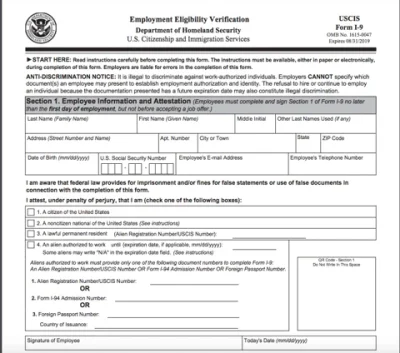
  • Section IEmployee Information. The employee provides information and documents to verify citizenship or immigration status and work eligibility. This section must be completed on the first day of employment.
  • Section IIEmployer Confirms Accuracy. The employer is responsible for reviewing and confirming the accuracy of the information and documents provided by the new hire. The employer must complete this section within three days of a new hire’s start date.
  • Section IIIEmployer Re-Verifying Work Authorization. This section is used to re-verify an employee’s work status, once employment authorization has expired or if documents have expired.

Further Reading: When ICE Knocks On Your Door

ENTER E-VERIFY

While Form I-9 was helpful in many ways, it could not solve the issue of illegal immigration alone. A decade after Form I-9 was mandated, new and tougher immigration legislation made hiring undocumented workers a crime. The idea was that stricter laws would eliminate job opportunities for undocumented workers and lead to a decrease in illegal immigration.

Enter E-Verify. In 1997, the U.S. government launched E-Verify to help employers expedite the work authorization process of new employees.  

Here’s how it works:

E-Verify 101. After a review of a new hire’s information from Section I of Form I-9, E-Verify employers must upload the completed form within three business days from the date the employee starts work for pay. Only one applicant can be verified at a time and the process cannot be used with existing employees.

The information on the new employee’s Form I-9 is then electronically matched against records from the databases of the Social Security Administration and the Department of Homeland Security. Once the form is uploaded to the E-Verify site, the new employee’s employment eligibility status is reported almost immediately.

If the applicant receives a Tentative Non-confirmation or TCN status, the employer is required to notify the applicant, who is provided a deadline to address the issue.
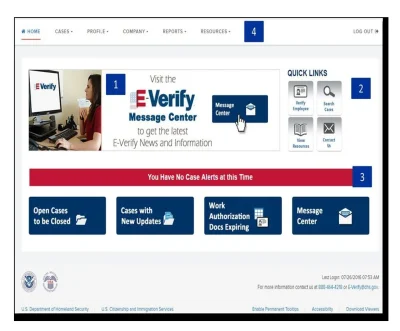
E-Verify 2.0.  E-Verify has come a long way in the two decades since it was first introduced. In the recent years, the Department of Homeland Security has accelerated efforts to strengthen its capabilities, including a $131 million investment to fund enhancements, expand services and make important technological upgrades. In 2017, E-Verify transitioned to a new and improved cloud-based software system and earlier this year, rolled out a dedicated website, www.E-Verify.gov. The new website is easier to use and is also optimized for mobile devices. Both employers and employees have access to a wealth of helpful resources such as, training webinars, news and updates, performance reports and usage statistic, and information about employee rights and employer responsibilities.

Employees Only: myE-Verify

As a way to combat fraud, protect employee identities and educate workers, E-verify added a dedicated portal for employees called myE-Verify. The site features free tools for identity protection and checking employment eligibility.

  • Self Lock. Employees can lock their social security number to prevent unauthorized use and fraud within E-Verify.
  • Self Check. Accessing the same databases used by E-Verify, the Self Check tool allows jobseekers to check their eligibility status and make corrections before arriving to the Form I-9 stage. Pre-screening applicants is against the law. Therefore, employers can’t require new hires to use Self Check as proof of employment authorization.

MANDATORY ENROLLMENT

Are all businesses required to use E-Verify?  It depends.

By federal law, all employers in the U.S. are required to complete a Form I-9 for every new employee. Currently, using E-Verify is only mandatory for federal contractors, state contractors, employers located in certain states, as well as companies participating in the Science, Technology, Engineering and Mathematics (STEM) program.

While E-Verify is available in all 50 states, the District of Columbia, Puerto Rico, Guam, and the U.S. Virgin Islands, only 22 states require employers to use it. And how each state requires employers to use E-Verify varies from state to state. For example, according to E-Verify laws in North Carolina, an employee is not considered an employee if the term of employment is less than nine months within a calendar year.

In addition, businesses are exempt from using E-Verify based on the number of employees which varies by state. In North Carolina, businesses with 25 employees or less are exempt, while businesses in Georgia, its 10 employees or less. And in some states, employers may be required to enroll in E-Verify in order to receive a business license.  

For now, E-Verify does not provide guidance on state or local E-Verify laws, so it’s important to be familiar with the laws in your state. 


AVOIDING THE MOST COMMON ERRORS

While E-verify makes it easier to verify employment eligibility, it doesn’t replace an employer’s responsibility for Form I-9.

According to ICE, more than 130,000 compliance violations were reported last year.  (LINK: https://www.ice.gov/factsheets/i9-inspection)

As the Minneapolis employment agency learned, simple Form I-9 errors proved to be an expensive lesson. Penalties for compliance violations, such as a missing Form I-9, range from $110 to $1,100 per violation and more serious breaches, such as employing unauthorized workers, range from $375 to $16,000 per violation.

Here are some of the most common and errors to avoid:

  • Missing the 3-Day Deadline. Once an employee provides the required documents and identity information, employers must submit the completed Form I-9 within three days from the new hire’s start date.
  • Verifying Existing Employees. E-Verify isn’t a pre-screening tool. Once enrolled, E-Verify can only be used for new hires. It’s illegal to use selectively on current employees or other people.
  • Information Errors. In many cases, errors are due to a simple oversight, such as a missing social security number or failing to update a name change after marriage. Hire Date and Payroll Date Don’t Match. The date the employee begins to work for pay must match the date in payroll records.
  • Failing to address a Tentative Non-Confirmation (TCN). E-Verify employers are required to notify the new employee of a TCN status. The employee then has eight business days to address the issue. It’s illegal to terminate, suspend, refuse to pay or train, or delay the start date of an employee because of TCN status.
  • Invalid Identity Documents. To verify the identity and employment eligibility, new employees must provide, in person, the original documents from an approved list provided by the Department of Homeland Security. Copies, faxes and emails will be rejected.
  • Photos Do Not Match. Often employers make the mistake of comparing the employee’s photo on E-Verify to the actual employee. The photo on the employee’s Form I-9 and the photo on the employee’s original identity documents must match. Now compatible with smartphones and tablets, E-Verify’s new photo-matching tool helps to detect mismatched photos.
  • Using the Wrong Form I-9. Using an outdated or incorrect form is a common mistake. For example, employers are required to use the most recent version of Form I-9, which includes the date 7/17/2017 located at the bottom left-hand corner of the form. The Spanish version of Form I-9 is only valid for new hires in Puerto Rico.
  • Missing Form I-9 Records. In addition to keeping Form I-9 records for every employee, employers must also store records of terminated employees for one year after the termination date or three years after the hire date, whichever is later.
  • Missing Employment Eligibility Poster. E-Verify employers are required to clearly display the Notice of E-Verify Participation and Right to Work posters in both English and Spanish.
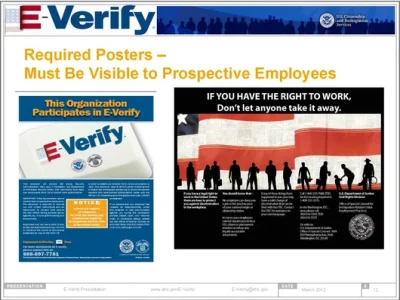
For more information about how to avoid common errors, visit www.uscis.gov.

WHAT YOU CAN DO

You can see why it’s important to establish strong employment verification procedures. Here are a few steps you can take now to protect your business.

Conduct a Compliance Review.  Be proactive and implement a compliance review program. Review your current procedures for new hires and training. Audit your current Form I-9 records and make necessary changes to avoid potential compliance issues in the future. A company’s effort to make corrections before an investigation occurs will help to reduce penalties.

Train Employees. Train employees on procedures for completing Form I-9, using E-Verify and the requirements for staying compliant.  

Consider an E-verify Employer Agent. Businesses can opt to outsource the employment verification process by hiring an E-Verify employer agent. In most cases, employer agents offer additional supporting services, such as background checks, legal assistance, payroll and accounting services.

READY OR NOT

Why enroll in E-Verify now? Increased efficiency, reduced chances for errors, and staying compliant are a few reasons companies are participating. While E-Verify is currently a voluntary program, change is coming. Smart businesses are staying ahead of the game by preparing for the inevitable national mandate, which immigration reform experts say could happen within the next three years – ready or not.

For the latest updates and more information about E-Verify, visit www.e-verify.gov.


Subscribe to our Blog for Fresh Weekly Content

This field is for validation purposes and should be left unchanged.
Related Posts

HR Software Simplified: Choosing the Right Technology for Your Business

Payroll, compliance, benefits, hiring . . . handled. The right HR technology simplifies it all. 

HR technology has come a long way. Today’s platforms use smart software, automation, and even AI to streamline everything from recruiting to retirement, all within one centralized system. The result? Fewer manual tasks, fewer costly errors, stronger compliance, and a better day-to-day experience for both your HR team and your employees.

And here’s the best part: You don’t need a Fortune 500 budget to benefit from enterprise-level tools.

How the Right HR Tech Helps Small & Mid-Sized Businesses

Modern HR tech isn’t just about digitizing paperwork – it’s about freeing your team to focus on people instead of processes.


🌐Increased Efficiency. Automation replaces repetitive manual tasks. Payroll, benefits enrollment, time tracking, and reporting happen faster and far more accurately.

🌐Improved Compliance. Systems automatically update for changing tax laws and labor regulations, helping reduce risk and prevent costly penalties.

🌐Better Hiring & Retention. The right tools accelerate recruiting, streamline onboarding, and provide analytics that flag retention risks early. Performance management features help keep employees engaged and growing.

🌐Cost Control. Real-time labor reporting prevents surprise overtime costs, while benefits analytics help you optimize offerings and spending.

🌐Scalability. As your company grows, your HR system grows with you without adding headcount just to manage paperwork.

HR Technology: The Basics

At its core, HR technology automates essential people operations: payroll, recruiting, benefits administration, time tracking, compliance, reporting, and so much more.  Choosing the right solution depends on your company’s size, internal expertise, and growth plans that support where your business is going. Here are some of the most common types of HR tech.

1. Human Resource Information System (HRIS)

An HRIS focuses on foundational HR functions, such as payroll, compliance, benefits administration, and employee records. Think of it as a secure digital home base for your workforce data.

Best for: Small to mid-size businesses with at least one person managing HR, and companies that want to keep HR in-house while moving beyond spreadsheets and paper processes.

2. Human Capital Management (HCM)

An HCM platform is a fully integrated ecosystem; It’s essentially your HR command center. These cloud-based systems manage the entire employee lifecycle, from recruiting and onboarding to performance management and succession planning.


When everything connects, data flows seamlessly across functions, eliminating duplicate entry and reducing errors. Its robust analytics turn HR from reactive administration into strategic workforce planning.

Best for: Mid-market to enterprise businesses and companies with multiple locations, global teams, or advanced talent strategies.

3. Specialized Software Tools

Many small businesses use standalone tools to address specific HR challenges, especially when an area is particularly complex or high-volume.

➡️➡️Link #1Read More: Work Smarter, Not Harder with HR Tech that Delivers

Best for: Any size business with a targeted need, such as payroll software to ramp up hiring for a specific area or time period, or companies that want to supplement an existing HR system.

A few examples include:

🔸ATS (Applicant Tracking System): Manages recruiting and hiring pipelines

🔸LMS (Learning Management System): Delivers and tracks employee training

🔸Standalone Payroll Platforms: Focus solely on payroll and tax filing

🔸Employee Engagement Tools: Measure culture, satisfaction, and feedback

🔸Workforce Management (WFM): Handles scheduling, shift planning, and labor forecasting

The PEO Advantage: Technology + Expertise


A Professional Employer Organization (PEO) offers something unique: enterprise-level HR technology paired with experienced human guidance, without requiring you to build an internal HR department.

From day one, a PEO gives your business access to a robust platform tailored to your size and growth stage, while experts handle payroll, compliance, benefits, and risk management on your behalf.

Key advantages of partnering with a PEO:

🚀Payroll & Tax Expertise. Payroll processing and tax filings are handled accurately and

🚀Payroll & Tax Expertise. Payroll processing and tax filings are handled accurately and on time, significantly reducing compliance risks.

🚀Access to Better Benefits. By pooling employees across many companies, PEOs can offer high-quality health insurance, retirement plans, and perks typically reserved for larger organizations.

🚀Compliance & Risk Management. Dedicated experts monitor changing employment laws at the federal, state, and local levels, which helps you avoid costly missteps.

🚀Streamlined Employee Lifecycle. From onboarding to offboarding, documentation, workflows, and approvals are centralized and automated.

Best for:  Small to mid-sized businesses as well as startups and growing companies that want big-company capabilities without big-company overhead.

The Selection Strategy: Questions That Matter


Before locking in software, step back and clarify what success looks like for your business.

☑️Start with Your Pain Points. What tasks consume the most time? Where do errors happen? Ask the people doing the work every day.

☑️Define Your Must-haves. Focus on solving the problems costing you the most money, time, or risk exposure – not flashy features you may never use.

☑️Plan for Growth. Consider your three- to five-year roadmap. Will you hire aggressively? Expand geographically? Choose a platform that won’t require replacing mid-growth.

☑️Evaluate Usability. If employees and managers won’t use it, the system won’t deliver value. Look for intuitive interfaces and strong mobile access.

☑️Understand the True Administrative Load. How much internal time will the system require once implemented?

☑️Clarify Data Ownership. Know how to retrieve your data if you change providers and associated costs.

☑️Watch for Hidden Fees. Ask about charges for reporting, integrations, additional admins, or support.

☑️Confirm Integration and Security. Ensure compatibility with accounting systems, CRM tools, and existing platforms, along with strong data protection standards.

☑️Assess Support Levels.  Who manages the rollout? How long will it take companies of your size to go live? Will you get technical help only, or access to HR expertise as well?

When a PEO Is the Smartest HR Tech Decision


For many small and mid-sized businesses, a PEO offers the simplest path forward: one unified, cloud-based solution that brings payroll, HR, benefits, compliance, and time tracking together in one place, backed by real experts.

🎯When HR technology handles the administrative grind, your business gains something far more valuable than efficiency: Focus.

▫️Focus on hiring great people
▫️Focus on building culture
▫️Focus on developing leaders
▫️Focus on growing the business

The Bottom Line: Choose Confidence, Not Just Software

The right HR technology doesn’t just make work easier; it also makes your business stronger, more resilient, and ready for what’s next. If your team is spending too much time managing forms, chasing compliance updates, or troubleshooting systems, it may be time to rethink your approach.

For many growing businesses, partnering with a PEO isn’t just a technology upgrade – it’s a strategic decision that delivers powerful tools, expert guidance, and peace of mind all at once. Because when your people operations run smoothly, everything else can move faster.

Are you ready to simplify HR and support your next stage of growth? A PEO could be the partner that helps you get there – confidently, efficiently, and with your focus exactly where it belongs: on your business and your people.

About Propel HR. Propel HR is an IRS-certified PEO that has been a leading provider of human resources and payroll solutions for more than 25 years. Propel partners with small to mid-sized businesses to manage payroll, employee benefits, compliance and risks, and other HR functions in a way that maximizes efficiency and reduces costs. For more information, visit www.propelhr.com

Sneaky HR Tasks Eating Your Time (and How to Fix Them)

It’s time to tackle those sneaky HR time thieves and take back your calendar. Here’s how.

IT’S HERE!

Your FREE HR Checklist

Here’s your checklist of important tasks related to payroll, benefits, compliance, and general HR. 

These tasks shouldn’t take up your workweek. But when systems fall short, they do. If you’re a small or mid-size business owner or HR leader, you probably didn’t get into this role because you love tracking down time-off requests, chasing signatures, or answering the same benefits question 14 times.


And yet… here we are.

Studies show that small business owners spend about 16 hours (or two full days) per week on HR-related administrative work.

Most businesses lose valuable time to the slow drip of small, repetitive “this will only take a minute,” tasks that quietly eat up the workweek. Add them up, and suddenly your strategic HR goals, like recruitment, retention, and leadership development, get pushed aside.

Here are some of the most common areas that may be draining your time.

Time-Consuming HR-Related Tasks

They seem small. But over time, these tasks drain your attention, your energy, and your progress.

1. Repetitive Tasks and Rework

Every time you hunt down a missing signature or resend login details, you lose time you could be using elsewhere. The common offenders? Answering the same employee questions over and over:

“How do I add my baby to insurance?”
“When do benefits start?”
“How many PTO days do I have left?”

Sound familiar?


Individually, these are quick answers. Collectively? They’re a constant interruption machine. When you stop to respond, you lose focus, break momentum, and push higher-value work further down your list.

🛠️ How To Fix It:  Uncover the pain points. Which areas are bogging down the process due to repetition? Where can you create a self-service culture? This can mean establishing a simple internal HR hub (in your intranet, shared drive, or HR platform), short FAQs on benefits, PTO, payroll timing, and onboarding, or short videos that walk through routine processes.

Then, train employees to go there first. When someone asks a repeated question, send the link along with your answer. Over time, behavior shifts. HR becomes a source, not a help desk.

2. Correcting Payroll Errors

The latest software makes running payroll seem easy, but if something goes wrong, the liability is still yours. Miscalculating pay, outdated tax information, and manually tracking time off are time-consuming to fix, hard to catch, and expensive if you don’t, not just in terms of costs but also in lost time and eroded trust among your workers.


🛠️ How To Fix It
:  Automate what you can. Look for tools that let employees request time off directly, route approvals to managers, automatically update balances, and sync with payroll.

When automation handles the basics, HR shifts away from data entry to policy guidance. You’ll still handle exceptions, but you won’t be stuck crunching numbers late at night.

➡️➡️READ MORE: DIY Payroll: Just Because You Can, Doesn’t Mean You Should 

Or leave it to the experts by outsourcing payroll to an IRS-certified PEO. A PEO can simplify the payroll process with a cloud-based payroll portal for employers, online employee access to pay stubs, W-2s, benefits info, employee handbooks, and secure, paperless direct deposits. They can also take care of onboarding, payroll taxes, IRS deposits, benefits administration, compliance guidance, and provide HR support.

3. DIY Compliance Monitoring

Labor laws change constantly. Posting requirements update. Salary thresholds shift. Leave laws multiply. Keeping up with shifting deadlines, state-level compliance requirements, and studying the IRS’s recently updated guidance under the One Big Beautiful Bill Act. Trying to monitor all of this yourself is not only time-consuming – it’s also stressful.


One misstep can be costly. In 2025, the Department of Labor’s Wage and Hour Division recovered more than $259 million in back wages for nearly 177,000 employees. That’s an average of $1,465 per worker (the most since 2019).

🛠️ How To Fix It:  Don’t carry compliance alone. Get expert help by partnering with a professional. Whether it’s through a PEO, outside counsel, or a compliance partner, get support that keeps you updated on requirements that apply to your business.

➡️➡️READ MORE: Navigating Compliance Minefields

You’ll need advice on tricky employee situations, alerts on multi-state regulatory changes, new pay transparency rules, evolving paid leave requirements, changing wage-and-hour laws, new employment-related laws on AI, and much more. 

🚀 Pro Tip: Stay compliant with our HR Checklist covering the latest updates and deadlines related to compliance, benefits, payroll, and general HR that you need to take care of each quarter. Download your free HR Checklist ➡️ HERE

4. Updating Employee Data in Multiple Places

Name changes. Address changes. Promotions. New pay rates. If you’re entering the same update into payroll, benefits, retirement platforms, and internal trackers, you’re doing triple-plus work and increasing the chance of errors. 


🛠️ How To Fix It
: Integrate your systems, invest in HR technology, or work with a PEO. A unified HR platform can help connect payroll, benefits, time tracking, and employee records, among other things.

With better integration, changes flow through automatically. That means fewer entries, fewer errors, and more free time.

5. Handling Every Employee Issue Personally

When you’re the only go-to for every conflict, complaint, or issue, your day gets hijacked fast. Some things absolutely belong with HR. But many could be resolved earlier and better by trained managers.

🛠️ How To Fix It: Upskill your managers by teaching them to give feedback, handle minor conflicts, and document specific issues.  This doesn’t remove HR from the process; rather, it elevates the role, moving them from firefighter to advisor.

Stop the HR Busy Work, Amplify Your Impact

Normalizing HR busy work has real consequences, including burnout. Your top performers may feel overwhelmed by constant overtime or pressure to meet demands. It also creates dependence on key team members, making it difficult to delegate when only a few people hold essential knowledge or responsibilities.

Maintaining inefficient processes limits growth, slows project delivery, and prevents your team from focusing on strategic initiatives. 🛠️ How To Fix It:  Partnering with an IRS-certified PEO can help. By taking on time-consuming tasks, PEOs help small businesses get back more time to focus on productivity and growth. In addition to saving time, a PEO can also save your business money by identifying inefficiencies, streamlining HR processes, and helping you make critical cost-cutting decisions.


Studies show that businesses working with a PEO:

☑️Grow twice as fast and are 50% less likely to go out of business

☑️Have a 12% lower employee turnover rate

☑️Have an ROI of 27.2 % per year, based on cost savings alone

☑️Experience double the annual median revenue growth, with an added 16% increase in profitability

If you constantly feel behind, the fix isn’t more hustle. It’s better tools, clearer processes, and the right support. A PEO can help you stop the small stuff from piling up, so you can invest your time where it matters most. And if you need help, just give us a call at📱 800-446-6567

Find Out What a PEO Can Do for You

If you’re a small to mid-sized business, a PEO can lighten your workload and strengthen your operations. Imagine focusing on growth while experts handle your payroll, taxes, benefits, HR, and compliance.

⬇️Read more about the advantages of working with a PEO in our series:

🔷 HELP WANTED: HR Team or PEO Partner


Investing in an HR team versus partnering with a PEO, which path is best for your small business? As your business grows, managing HR gets complicated – fast.

Should you build your own HR team or explore the benefits of partnering with a PEO? Here’s how to decide which choice best fits your business. ➡️Link #1Link #1Read More

🔷 NEW RESEARCH: More Small Businesses Are Turning to PEOs


Compelling research from the National Association of Professional Employer Organizations (NAPEO) shows that PEOs are helping small businesses scale – a game-changer in 2026.

Working with a PEO isn’t about outsourcing; it’s about upgrading how you manage HR.  It’s about investing in smarter growth, happier employees, and peace of mind. In a business world that’s only getting more complex, that’s a benefit worth having on your side. Thousands of successful businesses are already doing it – and the data proves it works. ➡️Link #2Link #2Read More

IT’S HERE!

Your FREE HR Checklist

Here’s your checklist of important tasks related to payroll, benefits, compliance, and general HR. 

AdobeStock_277387980_01
About Propel HR. Propel HR is an IRS-certified PEO and a leading provider of human resources and payroll solutions for 30 years. Propel partners with small to mid-sized businesses to manage payroll, employee benefits, compliance and risks, and other HR functions in a way that maximizes efficiency and reduces costs. For more information, visit propelhr.com

The Productivity Playbook: How to Turn Outsourcing into a Strategic Win

Here’s your game plan for turning outsourcing into a winning streak.

IT’S HERE!

Your FREE HR Checklist

Here’s your checklist of important tasks related to payroll, benefits, compliance, and general HR. 

Productivity is the secret sauce that separates teams stuck on the sidelines from those with winning streaks. Chances are you’re juggling hiring, compliance, benefits, culture, and about a dozen other priorities . . . all while the clock keeps ticking.

Your power play? Outsourcing. When used strategically, it boosts productivity, streamlines operations, and frees you up to focus on what actually moves the scoreboard – your bottom line.

First Quarter: What Productivity Really Means

In HR, productivity isn’t about sprinting faster – it’s about running the right plays at the right time.


True HR productivity means delivering meaningful outcomes with minimal wasted effort. Speed matters, sure, but impact matters more.

Fast hiring doesn’t matter if turnover remains high. Smooth payroll is great . . .  unless errors keep forcing replays.

At its core, productivity is about consistent, high-quality execution that supports your business year-round.

Here’s the basic stat line. The fundamental formula HR teams use looks like this: Productivity = Total Output / Total Input.

📤Output: Projects completed, revenue generated, goals achieved

📥Input: Labor hours, number of employees, or financial costs

It’s simple math but powerful when you track the right metrics.

Why HR Productivity Is For Champions

When HR productivity is dialed in, your entire team plays better.


Here’s what that looks like on the field:

🎯Better Employee Experience. Faster responses, smoother onboarding, clearer policies – all retention fuel.

🎯Stronger Compliance Defense. Mistakes lead to fines, audits, and penalties – that’s expensive. Productive HR keeps risk off the scoreboard.

🎯Scoring Efficiency. In the Red Zone, the stakes are high, and scoring opportunities significantly increase. When your HR team isn’t buried in paperwork, they can make a more strategic impact by focusing on culture, performance, and growth.

🎯Leadership Trust. HR shifts from order-taker to trusted partner.

The results? A productive HR function is the engine that keeps your people – and your business – moving forward.

The Stats Don’t Lie: Proof from the League

The data backs it up:

➡️Flexibility & Remote Work. A Gartner report finds that 43% of employees working flexible hours say they are more productive. Gallup found that fully remote workers report the highest engagement levels.

➡️Engagement Matters. Highly engaged teams are 17% – 21% more productive than disengaged ones.

➡️The Productivity Gap. Top-tier companies grew more productive, while others saw declines due to inefficient collaboration and low engagement.

🎯Winning teams don’t guess; they measure, adjust, optimize, and power up.

The Box Score: Common HR Productivity Metrics


To know how your team is performing, you need the right stats:

📊 Output Metrics. Revenue per employee, output per hour, goals completed vs. assigned

📊 Efficiency Metrics. Time spent per task, employee utilization

📊 Quality Metrics. Accuracy and impact, not just speed

📊 Engagement Indicators. Engagement scores and absenteeism.

📊 Financial Metrics. Total Cost of Workforce (TCOW)

These numbers tell you whether your plays are working and what needs to be redesigned.

Second Half Adjustments

This is where smart teams pull ahead. One of the most effective strategies? Outsourcing to a Professional Employer Organization (PEO).

A PEO helps improve productivity by offloading time-consuming tasks while strengthening the entire employee lifecycle through MVP expertise and next-level HR tech.

🔥Think of it as adding multiple Tom Bradys to your roster.

THE GAME PLAN

Play #1: Reallocate Resources to Core Strengths


The fastest productivity gain comes from freeing your teams from admin overload. By outsourcing, you get:

Time Savings. Business owners can spend 20+ hours per month on HR admin-related tasks. Outsourcing frees up time for growth, sales, and strategy.

Administrative Relief. Payroll, benefits enrollment, and multi-state compliance tasks move off your plate and into expert hands.

A Team of MVPs. Outsourcing gives you access to a team of pros, ready to help when you need it.

Play #2: Build a Deeper Talent Bench that Flexes

An engaged workforce is naturally more productive.

💼 Lower Turnover. Companies using PEOs see 10%–14% lower turnover, reducing disruptions and retraining time.

💼 Big-league Benefits. PEOs provide access to Fortune 500-level benefits, boosting satisfaction and engagement.

💼 Faster Onboarding. Streamlined onboarding helps new hires get in the game.

Play #3: Upgrade Your Tech Stack

PEOs give small and mid-sized businesses access to advanced HR technology without the big-ticket price tag.

📊 Automation. Payroll and tax automation reduce errors and time-consuming fixes.

📊 Employee Self-service. Employees handle PTO, pay stubs, and benefits updates themselves with fewer interruptions for HR.

Play #4: Strengthen Your Compliance Defense


Compliance isn’t optional and managing it internally can drain focus fast. With a PEO on your team, you get:

🛡️Expert Guidance. A team of HR pros helps prevent fumbles and penalties. PEOs stay on top of federal, state, and local regulations, including ACA and FMLA.

🛡️Safety Programs. Proactive safety audits reduce workplace incidents and business disruption.

Play #5: Win on the Scoreboard

All these efficiencies lead to real, measurable stats:

🏆Faster Growth. Businesses using a PEO grow 7% – 9% faster than those that don’t. And are 50% Less Likely to Go Out of Business

🏆High ROI. The average annual return on investment is 27.2% based solely on cost savings.

💥That’s not just a win – it’s a blowout. It’s the stuff championships are made of.

FINAL CALL: Make Productivity Your Winning Play!


How far can you go? Productivity isn’t a one-time drill – it’s a GOAT mindset.

When you measure what matters, optimize repetitive work, and outsource strategically, you’re not just working faster . . . You’re working smarter. That’s for legends.

🔥Outsourcing is no rookie move. It’s a strategic productivity partner that helps HR shift from scrambling to scoring. And keeping that winning streak hot.

Ready to Turn HR into a Powerhouse?

Ready to hear your crowd ROOOAAARRR? 🎉 This power playbook is your first step.

➡️If you need some coaching or a huddle about your productivity game plan, we’ve got you all the way to the Super Bowl winning streak and beyond – just give us a call.

IT’S HERE!

Your FREE HR Checklist

Here’s your checklist of important tasks related to payroll, benefits, compliance, and general HR. 

AdobeStock_277387980_01
About Propel HR. Propel HR is an IRS-certified PEO and a leading provider of human resources and payroll solutions for 30 years. Propel partners with small to mid-sized businesses to manage payroll, employee benefits, compliance, risk, and other HR functions in ways that maximize efficiency and reduce costs. To learn more, visit propelhr.com
hr-division
HR Division of Propel HR

The HR Division is made up of a team of professionals with a vast level of experience and HR expertise, assisting organizations of all sizes and within a wide variety of industries. They readily partner with clients to address strategic and compliance challenges surrounding the employment life-cycle and the ever-changing laws that regulate it. Inquire below about how they can help you!